
![Talk To NPC System V4 [Dialog System][Standalone]](https://fivem-store.com/wp-content/uploads/talk-to-npc-system-v4-dialog-systemstandalone-150x84.png "Talk To NPC System V4 [Dialog System][Standalone] | FiveM Store")
![Talk To NPC System V4 [Dialog System][Standalone]](https://fivem-store.com/wp-content/uploads/talk-to-npc-system-v4-dialog-systemstandalone-2-150x84.png "Talk To NPC System V4 [Dialog System][Standalone] | FiveM Store")
![Talk To NPC System V4 [Dialog System][Standalone]](https://fivem-store.com/wp-content/uploads/talk-to-npc-system-v4-dialog-systemstandalone-3-150x84.png "Talk To NPC System V4 [Dialog System][Standalone] | FiveM Store")
![Talk To NPC System V4 [Dialog System][Standalone]](https://fivem-store.com/wp-content/uploads/talk-to-npc-system-v4-dialog-systemstandalone-4-150x84.png "Talk To NPC System V4 [Dialog System][Standalone] | FiveM Store")
100% Open Source This advanced dialogue script features a clean interface, titles & tags, and audio-text synchronization for seamless dialogue. It includes head movement imitation, interactive buttons, and an adjustable typing effect. The script supports chat-style messages, items selection with extensive inventory support, and is highly configurable for various needs. Perfect for creating professional, interactive dialogues. Titles and Tags: You can set the title of the dialogue and add tags to it. Tags can have different colors and optionally icons, allowing for better organization and visual differentiation. Message: The message in the dialogue can be customized in terms of content, typing effect, and text display speed. Additionally, the message can be synchronized with an audio file so that the text appears in rhythm with the played sound. Buttons: The script offers four types of buttons: Regular button – a standard button for selection, Item selection button – allows the player to choose an item from their inventory, Text input button – enables the player to enter text, Number input button – allows the player to enter a number. Item Selection: When triggering the dialogue, you can specify items that the player can choose, provided they have them. This feature is crucial for interactivity and immersion. Messages for Nearby Players: You can set it up so that nearby players see the responses and dialogue messages in the chat. This is a great tool for creating shared experiences. Audio System: For better immersion, the script supports an audio system. Messages can be played synchronously with a sound file, adding realism. Head Movement Imitation: The script simulates natural head movement of the speaker, which looks much better than a static, motionless camera. Camera Position: You can adjust the camera position at any angle relative to the speaker to achieve the optimal shot. Field of View (FOV): If the default field of view doesn’t suit you, you can change it. The script offers full control over FOV. Camera Transition Animation: You can decide whether the camera should smoothly transition to a new position and also set the duration of this animation. Speaker Animation: By default, the script sets the speaker’s animation to talking and lip-syncing. However, you can customize these animations to better fit your scenario
Limited Offer!
-
![Talk To NPC System V4 [Dialog System][Standalone]](https://fivem-store.com/wp-content/uploads/talk-to-npc-system-v4-dialog-systemstandalone.png "Talk To NPC System V4 [Dialog System][Standalone] | FiveM Store") Talk To NPC System V4 [Dialog System][Standalone]
Talk To NPC System V4 [Dialog System][Standalone] -
![Talk To NPC System V4 [Dialog System][Standalone]](https://fivem-store.com/wp-content/uploads/talk-to-npc-system-v4-dialog-systemstandalone-2.png "Talk To NPC System V4 [Dialog System][Standalone] | FiveM Store") Talk To NPC System V4 [Dialog System][Standalone]
Talk To NPC System V4 [Dialog System][Standalone] -
![Talk To NPC System V4 [Dialog System][Standalone]](https://fivem-store.com/wp-content/uploads/talk-to-npc-system-v4-dialog-systemstandalone-3.png "Talk To NPC System V4 [Dialog System][Standalone] | FiveM Store") Talk To NPC System V4 [Dialog System][Standalone]
Talk To NPC System V4 [Dialog System][Standalone] -
![Talk To NPC System V4 [Dialog System][Standalone]](https://fivem-store.com/wp-content/uploads/talk-to-npc-system-v4-dialog-systemstandalone-4.png "Talk To NPC System V4 [Dialog System][Standalone] | FiveM Store") Talk To NPC System V4 [Dialog System][Standalone]
Talk To NPC System V4 [Dialog System][Standalone]
![Interactions System V4 [Target Eye][Text UI][Standalone]](https://fivem-store.com/wp-content/uploads/interactions-system-v4-target-eyetext-uistandalone-300x225.png) Interactions System V4 [Target Eye][Text UI][Standalone]
Original price was: $20.00.$15.00Current price is: $15.00.
Interactions System V4 [Target Eye][Text UI][Standalone]
Original price was: $20.00.$15.00Current price is: $15.00.
![Money Wash System V5 [Ownable Laundry][ESX/QB]](https://fivem-store.com/wp-content/uploads/money-wash-system-v5-ownable-laundryesx-qb-300x225.png) Money Wash System V5 [Ownable Laundry][ESX/QB]
Original price was: $30.00.$25.00Current price is: $25.00.
Money Wash System V5 [Ownable Laundry][ESX/QB]
Original price was: $30.00.$25.00Current price is: $25.00.
Talk To NPC System V4 [Dialog System][Standalone]
Original price was: $20.00.$15.00Current price is: $15.00.
-25%File Scan Status: Clean
Powered by VirusTotal
Hurry! This sale ends in
0
Days
:
4
Hours
:
0
Mins
:
0
Secs
Pairs well with
![Advanced Wallet System V2 [Badges System][ESX]](https://fivem-store.com/wp-content/uploads/advanced-wallet-system-v2-badges-systemesx-300x225.png)
Advanced Wallet System V2 [Badges System][ESX] Original price was: $19.00.$14.00Current price is: $14.00.
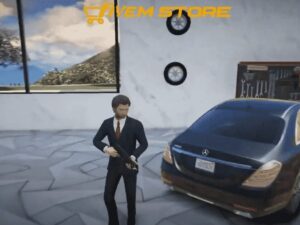
Mafia MLO V3 + Mafia Car + Mafia Skin Original price was: $30.00.$25.00Current price is: $25.00.

![Hurt System V1 [Standalone]](https://fivem-store.com/wp-content/uploads/2021/09/hurt-system-v1-standalone-300x225.jpg)
Only logged in customers who have purchased this product may leave a review.

![Boombox System V3 [Music Player][Car Music][ESX/QB]](https://fivem-store.com/wp-content/uploads/boombox-system-v3-music-playercar-musicesx-qb-300x225.png)
![Store Robbery V5 [Shop Robbery][Standalone]](https://fivem-store.com/wp-content/uploads/store-robbery-v5-shop-robberystandalone-300x225.jpg)
![NoPixel Clothes System [Updated]](https://fivem-store.com/wp-content/uploads/2020/05/nopixel-clothes-system-updated-300x225.jpg)


Reviews
There are no reviews yet.